If you just want to read a shortened version of this, click this link:
This is my homelab – The short version
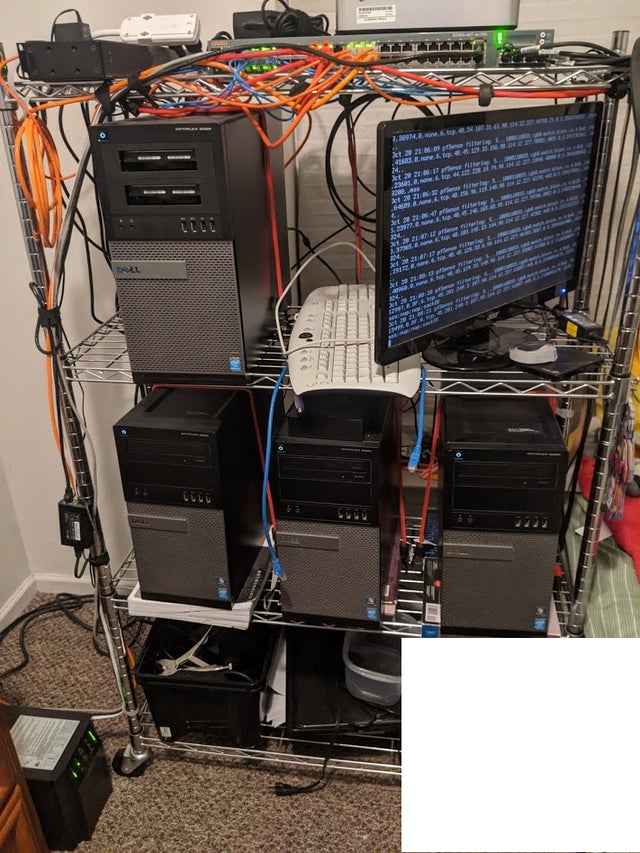
This is my homelab. There are many like it, but this one is mine.
My homelab is my best friend. It is part of my life. I must master it as I must master my life.
Without proper documentation, my homelab is useless. Without my homelab, I am less skilled. I must build my homelab true. My firewall rules must be straighter than an attacker who is trying to get access to my homelab. I must delay the attacker enough that they will move on to someone else.
My homelab and I know that what counts on the internet is not the data we send and receive, the burst of our internet connection, nor the electricity bill we make. We know that it is the experience that count.
My homelab is human, even as I [am human], because it is my life. Thus, I will learn it as a brother. I will learn its weaknesses, its strength, its management interfaces, its resources, its connectors and its cables. I will keep my homelab clean and ready, even as I am clean and ready. We will become part of each other.
Before Tux, I swear this creed. My homelab and I are the defenders of my career. We are the masters of our data. We are the saviors of this little space on the internet.
So be it, until Microsoft can release Cumulative Updates that don’t break things, but peace!
I have a homelab for multiple reasons:
I can replicate parts of things I use at work so when I am stuck on a particular issue I can test without fear of breaking production (if I am working somewhere without a test environment).
I can break things and have it not be a emergency.
I can play with things such as Kubernettes, Docker, Ansible in my own environment.
It gives me things to talk about in interviews.
I can learn new skills/applications/etc without having to wait for my current job to start using them.
My homelab history:
v0: The Domain Controller
I recycled an HP xw4600 workstation, maxed the RAM out at 8 GB, installed Server 2012 on it, setup Active Directory, and generally used it as a learning round for not knowing much of anything about active directory (Both my first and second IT jobs were at places that did not use Active Directory, #ShockingIKnow)
v0.5: The first ESXi host
I recycled an HP Z400 Workstation, maxed the RAM out at 12GB, and installed ESXi on it. Ran a secondary CentOS Samba Active Directory Domain Controller in a VM (just to see if it could be done). Also decided that I would quickly grow too far for this and that I needed to plan out and put together a better solution.
v1: The beginning
3 Dell Optiplex 9020 Minitowers each with an Intel i5 Quad Core processor, 32GB of RAM, 1TB Internal SSD, 2TB Internal HDD, Intel I340 Quad Ethernet. vSphere 6.7 U3 cluster (Yay VMUG).
So it probably begs the question why would I pick these Optiplex desktops instead of regular servers like most homelab folks to run ESXi/vSphere?
Simply put, at the time the Optiplex 9020s were to me the intersection of cheap to buy, not electricity hungry (I’ve worked with PowerEdge 2950s, so I know hungry) and could be loaded with enough RAM where I don’t necessarily feel limited running more than 3 VMs on a host.
I originally used the Internal SSDs and HDDs for a mix of fast storage and slow storage (I didn’t know, much less attempt at doing a Starwinds or VMware vSAN setup), but I decided I would eventually get to running shared iSCSI storage to be able to easy migrate VMs to different hosts when I need to run updates.
I also originally ran pfSense from a VM (hence why I ran Quad-port ethernet card), but quickly got tired of basically killing my network whenever I needed to reboot a host from updates/patches.
I currently have VMs for AD Domain Controllers, Postfix relay to Office 365, Gitlab install for all my git repos and intergration/deployment, Veeam, Docker Hosts (separate private and public hosts), and eventually an internal Kubernettes cluster.
Aruba 2500-48T managed switch
I wanted an inexpensive but good and capable switch with a bunch of gigabit ethernet ports that also has SFP+ ports for eventually running centralized storage traffic over at higher speeds than 1Gig.
Ruckus R600 Access Point (running Unleashed firmware)
Because I didn’t want to be like everyone else and run Ubiquiti. Run a few SSIDs separated to specific VLANs for personal Devices, IoT stuff, and Guest Devices. Also, BeamFlex FTW.
APC SmartUPS 2200 (with a 9617 Network Management Card)
I have this connected to a Powerchute network install so that if I lost power, it will tell my VMs to turn off and shutdown my VM hosts.
APC PDU 7800
Its a glorified Power Strip that has a digital readout of the Amps That I use, and a network interface to check that is compatible with residential 15A plugs/equipment.
v1.5: pfSense escape plan
HP T730 8GB RAM/16GB SSD with a Quad Gig Ethernet Intel I340 running PFsense for Firewall/VLANS/Routing.
This is my solution to needing my network available when I reboot a VM host, as well as not being able to get pfSync working after about a month of fighting. I probably will at some point attempt pfSync again.
v1.8: Centralized storage robo go.
Dell Optiplex 9020 FreeNAS/TrueNAS iSCSI host i5/16GB/4 2TB Drives in a RAID10
After thinking about getting a HP Microserver, or finding the cheapest Synology box I could get, I landed at the same intersection again of price, hardware, and energy needs that running one more 9020 Optiplex could give me. As far as software, as much as I like Xpenlogy, the purpose of this was mainly for iSCSI, which I felt is better in FreeNAS (now TrueNAS).
In addition to this, I outfitted my three ESXI hosts and the TrueNAS host with Mellanox Connect X2 SFP+ cards and Molex DAC cables (the Aruba switch is very particular about what types of Connectors it will accept).
Future Upgrades:
As far as upgrades, I only see at this point possibly replacing the i5 processors in my Optiplex ESX hosts with Xeons (yes, Optiplex 9020s can run on Xeon processors). Outside of that, I only see replacing the hosts with Optiplex 5070s or 7070s.